Questions & answers
Frequently asked
Common questions about MapleCreator. Have something else? Email support@mapleworksuite.com.
What is MapleCreator?
MapleCreator is the Canadian-built AI content studio inside MapleWorkSuite. Upload one video, photo, or brief and the AI writes platform-tuned captions, titles, hashtags, and descriptions for Facebook, Instagram, LinkedIn, Reddit, Pinterest, YouTube, TikTok, and X - then publishes everywhere in one click. It is designed for Canadian small and medium-sized businesses that want professional social content without a $499/month agency retainer, and it is priced in CAD with no per-FX surprises.
How is MapleCreator different from Jasper, ChatGPT, or Copy.ai?
Jasper, ChatGPT, and Copy.ai are general-purpose writing assistants - you paste a prompt, they hand you back text, and the rest (formatting per platform, hashtag research, upload, scheduling, revenue tracking) is on you. MapleCreator is an end-to-end publishing studio: it understands the difference between Facebook warmth, Instagram hashtag-first, LinkedIn professionalism, and Reddit conversational, drafts each variant from one brief, schedules and publishes natively (including real YouTube Data API uploads, not just scheduling), and tracks revenue per channel so the AI coach can suggest your next three actions. It is Canadian-hosted, CAD-billed, and PIPEDA-compliant - none of which the US-based AI writers offer out of the box.
Does MapleCreator match my brand voice?
Yes. MapleCreator learns your brand voice from the last twenty pieces of content you have published (or that you upload during onboarding). It picks up your reading level, sentence cadence, signature phrases, and the topics you cover, then drafts new content in that voice. You can also pin a tone explicitly - Canadian-English, formal, playful, technical, founder-led - and the AI adapts every platform variant accordingly. Every generation is editable, versioned, and never silently overwrites your edits.
Can it write in English and French for Canadian SMBs?
Yes. MapleCreator drafts content in Canadian English (with your "u" in colour and "re" in centre intact) and in Quebec French. Bilingual workspaces can generate both variants from a single brief and post them simultaneously to language-tagged audiences. Translation is handled by Canadian-hosted models with a human-in-the-loop review step, and we never ship your content or your customer data to third-party LLMs without a signed DPA. Loi 25 / Bill 64 obligations are honoured by default.
How does it integrate with MapleMail, MapleMarketing, and the rest of MapleWorkSuite?
MapleCreator is a first-class citizen of MapleWorkSuite, not a webhook bolted on. Generated content can be dropped straight into a MapleMarketing campaign or drip workflow, attached to a MapleMail thread for client review, scheduled against the MapleCalendar marketing planner, or attributed back to revenue in MapleAnalytics. Tokens are shared across every Maple product - if you have 100,000 tokens on Creator tier, you can spend them in MapleMail, MapleConcierge, MapleMarketing, or any other Maple app. No double-billing for AI credits.
How much does MapleCreator cost in CAD?
Five tiers, all priced in CAD: Free ($0 / mo) with 500 MB storage, 1,000 tokens, and Facebook + Instagram + LinkedIn + Reddit publishing; Starter ($9 / mo) with 5 GB and 25,000 tokens plus Pinterest; Creator ($19 / mo) with 25 GB and 100,000 tokens plus YouTube (1 channel) - our most popular plan; Pro ($49 / mo) with 100 GB, 500,000 tokens, 5 YouTube channels, and the AI revenue coach; and Studio ($99 / mo) with 500 GB, 2,000,000 tokens, and 25 YouTube channels. Add-ons are pay-as-you-go: +10 GB / $2 / mo, +100k tokens / $5 / mo, +1 YouTube channel / $3 / mo. Annual prepay saves roughly two months on every tier and there are no per-post, per-platform, or per-seat fees.
Is MapleCreator PIPEDA-compliant?
Yes. All uploaded assets, generated content, scheduling metadata, and engagement events are stored on Canadian-hosted infrastructure (Maritimes and Central Canada) with end-to-end encryption at rest and in transit. We align with PIPEDA, Quebec Law 25 (Bill 64), and provincial privacy acts. Your raw uploads and AI-generated drafts never leave Canadian infrastructure and are never used to train third-party models. Subjects can exercise access, correction, and deletion requests through a self-serve portal that returns within the statutory thirty-day window, and full audit trails are retained for the statutory seven-year minimum.
Can I use it for social posts, blog content, and product descriptions?
Yes - MapleCreator is built to be your one content studio across formats. Social posts (8 platforms with platform-tuned variants), long-form blog drafts with SEO outlines, product descriptions for your storefront, video titles and descriptions, YouTube chapter markers, Pinterest pin copy, and X / Threads short-form are all first-class output types. Brand voice, token budget, and Canadian compliance flow through every format identically, so a single brief can fan out to a blog post, an Instagram carousel, a LinkedIn article, three pins, and a YouTube upload in one publish action.
What is MapleCreator and what does it do?
MapleCreator is the AI content-creation studio inside MapleWorkSuite that not only writes and generates content but publishes it directly to your content platforms - YouTube, Facebook, and X. You start from a brief, photo, or video; the AI helps create the content (including images and video); and MapleCreator pushes it live to your connected channels, so creation and publishing happen in one place.
Which platforms can I publish to with MapleCreator?
MapleCreator publishes directly to YouTube, Facebook, and X. From a single workspace you connect those accounts once, create your content with AI, and publish to your chosen platforms without leaving MapleCreator.
How many YouTube channels and Google accounts can I connect?
It depends on your tier. The Free tier supports one YouTube channel. The Studio tier supports unlimited YouTube channels across unlimited Google accounts, plus Facebook and X. So creators managing many channels or running channels under several Google accounts should choose Studio.
What is the difference between the Free and Studio tiers?
The tiers differ by capacity, not by AI usage. Free covers a single YouTube channel - ideal for getting started. Studio unlocks unlimited YouTube channels across unlimited Google accounts, plus Facebook and X publishing, for creators and teams managing content at scale. AI generation on either tier is billed separately in Maple AI tokens.
Does MapleCreator cost tokens, and are there any free tokens?
AI generation - creating images, video, and written content - is billed in Maple AI tokens, and there are no free tokens included on any tier. The tiers (Free and Studio) determine your channel and account capacity, not your AI usage. For current rates and what is included, see the pricing section on the MapleCreator page.
How much does MapleCreator cost?
Pricing is by capacity: the Free tier gives you one YouTube channel, and the Studio tier gives you unlimited YouTube channels across unlimited Google accounts plus Facebook and X. AI generation on any tier is billed separately in Maple AI tokens - there are no free tokens. Check the pricing section on the MapleCreator page for the latest details.
What kinds of content can MapleCreator create?
MapleCreator helps you create video, images, and written content - titles, descriptions, captions, and posts tuned for the platform you are publishing to. The AI generation that produces images, video, and content is billed in Maple AI tokens.
Can MapleCreator generate images and video, not just text?
Yes. Beyond written content, MapleCreator can generate images and video for your posts and channels. Because this is AI generation, it is billed in Maple AI tokens; the channel and account capacity you get is set by your tier (Free or Studio).
Can I schedule posts with MapleCreator?
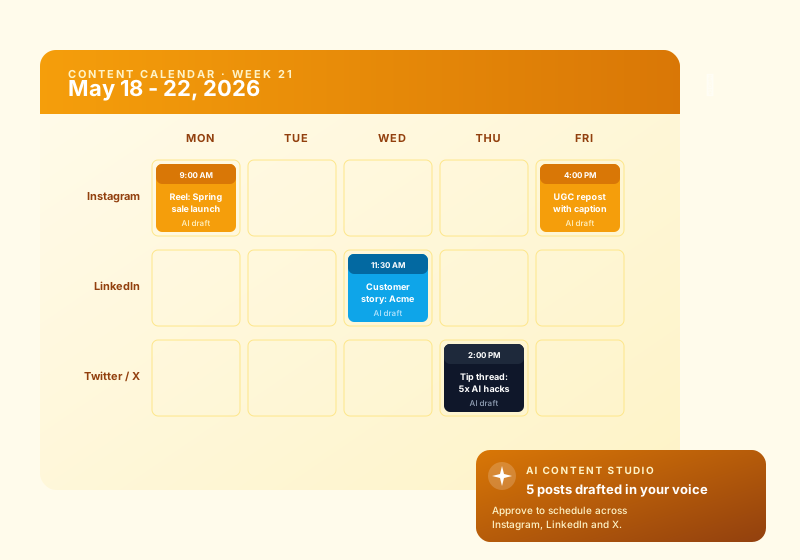
Yes. MapleCreator lets you schedule content to publish to your connected YouTube, Facebook, and X destinations, so you can plan ahead and post at the right time instead of publishing everything manually in the moment.
Do I need my own Google and YouTube accounts to use MapleCreator?
Yes. MapleCreator publishes to your own channels, so you connect your own Google/YouTube accounts (and Facebook and X). On the Free tier you connect one YouTube channel; on Studio you can connect unlimited YouTube channels across unlimited Google accounts.
Can MapleCreator manage multiple accounts and channels at once?
Yes, on the Studio tier. Studio supports unlimited YouTube channels across unlimited Google accounts, plus Facebook and X, so agencies and multi-channel creators can create and publish across all of their accounts from one place. The Free tier is limited to a single YouTube channel.
Is MapleCreator Canadian-hosted and PIPEDA-compliant?
Yes. MapleCreator is part of MapleWorkSuite, a Canadian-built platform hosted on Canadian infrastructure and operated in line with PIPEDA and applicable provincial privacy law. Your content and account data are handled under Canadian privacy standards.
How is MapleCreator different from a standalone AI writer or a separate scheduler?
Standalone AI writers stop at giving you text, and separate schedulers expect you to bring your own finished content. MapleCreator combines both: it creates the content - including images and video - with AI, then publishes it directly to YouTube, Facebook, and X. It is Canadian-hosted, part of MapleWorkSuite, with AI generation billed transparently in Maple AI tokens.
Who is MapleCreator for?
MapleCreator is for creators, small businesses, and teams who want to create content with AI and publish it straight to YouTube, Facebook, and X. Start free with a single YouTube channel, or choose Studio to run unlimited YouTube channels across unlimited Google accounts plus Facebook and X.
How do I get started with MapleCreator?
Start on the Free tier, connect your YouTube channel, and create your first piece of content with AI. When you need more - additional YouTube channels, multiple Google accounts, or Facebook and X publishing - upgrade to Studio. AI generation is billed in Maple AI tokens; see the pricing section on the MapleCreator page to plan your usage.
Is there a free plan for MapleCreator?
Yes. MapleCreator offers a free account so you can start with no credit card and no commitment. Create your free account, explore the core features, and upgrade to a paid plan only when you need more volume or advanced capabilities.